Screenshot Evidence Standards in SOC 2 Audits
Auditors reject screenshots missing timestamps, URLs, user IDs, or environment context.

- Written by
- Compliance Primer Editors
- Updated
- October 20, 2026
- Reading time
- 13 min read
- Sources cited
- 5 sources ↓
What this covers
Screenshot evidence is the backbone of most SOC 2 audits, and its acceptance depends on four things: completeness, context, tamper-evidence, and traceability. Most compliance teams don't learn these standards until an auditor kicks a submission back with a one-line rejection and no further explanation. This piece breaks down what auditors are actually checking for, why the format is under more scrutiny than it used to be, and where teams get it wrong without realizing it.
Screenshots became the default evidence type for a practical reason: they're tangible. A signed offer letter, an HR system showing a start date, an access log confirming a permission change. Each one is a still image standing in for an event that already happened. For a huge swath of application-layer controls, the screenshot is the only option available. Logical access settings, change management approvals, vulnerability scan results: these often live entirely inside a UI with no API, no export button, no programmatic trail. If you want to prove a toggle was flipped on a specific date, you point a camera at the screen. Vanta reported that 36% of the 650,000 images uploaded to its platform over the previous year were screenshots submitted as compliance evidence. That's more than a third of all visual evidence in the system, which tells you something about how deeply embedded the format has become, and how much weight is riding on whether it's done right.
That weight is exactly the problem. Auditor expectations have moved, and point-in-time proof no longer clears the bar it used to. Screenshots clearly belong in a SOC 2 audit. The open question is what separates a screenshot an auditor accepts from one that gets flagged, and why so many teams find out the difference the hard way.
What auditors are actually evaluating when they review a screenshot
An auditor's actual job is narrower than people assume. They aren't confirming that a control exists on paper somewhere, in a policy document nobody reads twice. They're testing whether the control operated as designed, in practice, during the specific window under review. That distinction sounds subtle. It isn't. A firewall rule that's technically correct but undocumented might as well not exist for audit purposes, because SOC 2 tests provability, not just security.
Evidence gets evaluated on four dimensions, and it's worth naming them plainly because most rejections trace back to one of these four failing quietly. Completeness asks whether the evidence covers the relevant period, not just one lucky Tuesday. Accuracy asks whether the image faithfully represents the actual system state, no cropping tricks, no staged environments. Context asks whether the auditor can place the screenshot in the right system and the right moment without having to take anyone's word for it. Traceability asks whether it ties back to a named user, a named system, and a specific timestamp. Miss one of the four, and the auditor has a picture with a hole in it rather than proof.
Here's the part that trips people up: auditors are grading the evidence itself, not the person who captured it. A legible timestamp, a visible system and account in frame, a clear scope of what's shown, a direct link to the control being tested. That's what gets scored. Who took the screenshot barely factors in.
The Type I versus Type II distinction matters more here than most people credit it for. Type I covers control design at a single point in time, essentially a snapshot of intent. Type II covers operating effectiveness across an observation period, usually somewhere between three and twelve months. A screenshot that's fine for Type I can fail Type II outright, because Type II is asking a fundamentally different question: not "did this exist," but "did this hold up, consistently, across the whole window." The governing frameworks back this up directly. AICPA's SSAE 18 Section 320 lays out the examination structure, and the Trust Services Criteria, issued in 2017 and updated with revised points of focus in 2022, spell out what controls actually need to be evidenced. Neither document mentions screenshots by name. Both explain, in effect, why a screenshot alone is rarely enough.
The four elements a screenshot must contain to be considered valid
Practitioners have converged on a fairly consistent four-element standard, and once you see it laid out, the logic behind each piece stops feeling arbitrary.
First, the system timestamp. It needs to be visible in the image itself, or embedded securely in the file's metadata where it can't be casually edited. A screenshot with no verifiable timestamp is functionally useless for a Type II observation period, because the auditor has no way to confirm it falls inside the window they're testing. Second, the URL or system identifier: the full browser address bar, or a hostname and system ID if it isn't browser-based. This is what proves the evidence came from production rather than from a staging environment someone spun up to make a demo look clean. Third, user identity: whose account performed the action, or whose account captured the screenshot. A file called settings.png with no visible account attached means the auditor has nothing to verify against, and they will not simply take the word of whoever submitted it. Fourth, environment context. Production versus staging needs to be unambiguous, because conflating the two is a well-documented rejection trigger.
A few operational habits reinforce all four. Timestamps in UTC, not local time zones that shift depending on who's traveling that week. Consistent formatting across submissions, full screen captures rather than cropped fragments, visible file paths rather than trimmed edges. Auditors reviewing dozens of these submissions back to back read inconsistency as a signal, and the signal it sends is that collection was ad hoc rather than systematic.
Which brings up the file name trap, a small thing that causes outsized headaches. Name a file screenshot_final_v2.png and you've handed the auditor nothing to work with. They can't confirm when it was captured, so they have to ask, which adds a follow-up cycle, which adds days. Name it 2026-03-14_CC6.2_okta_admin_console.png and half the traceability problem solves itself before anyone asks a question.
Where screenshot evidence breaks down most often in practice
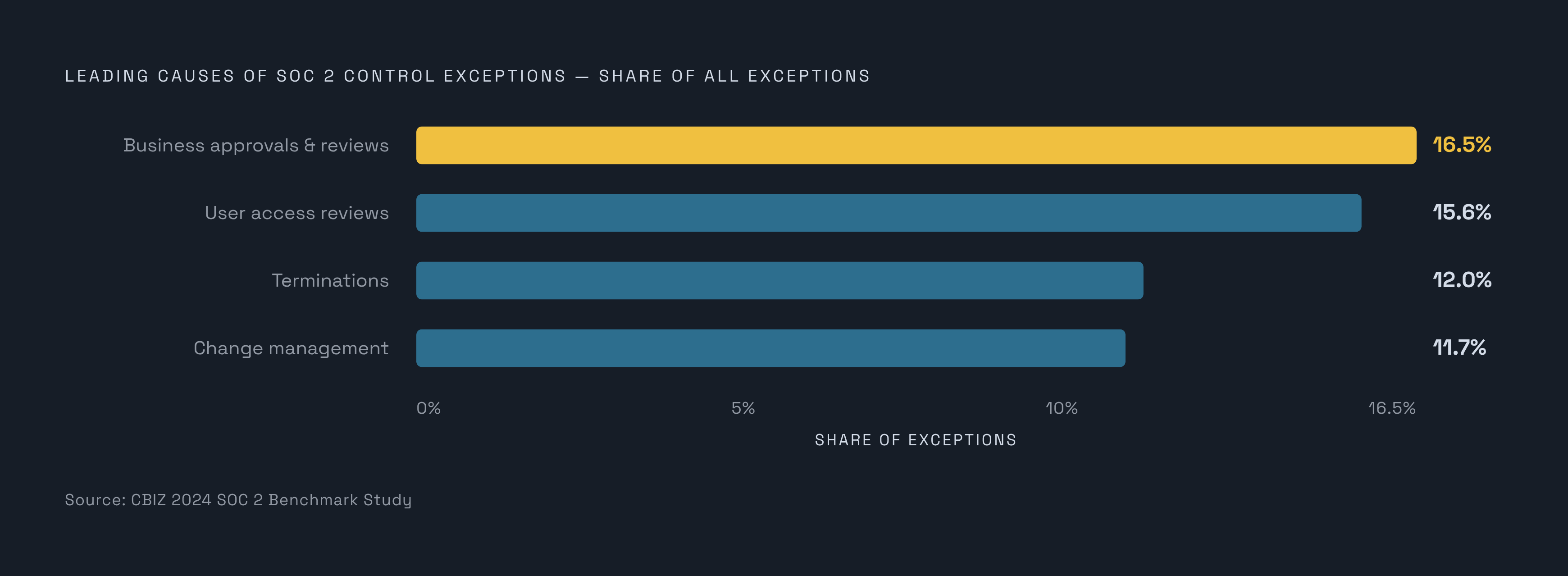
The CBIZ 2024 Benchmark Study found that 54.9% of SOC 2 reports included at least one control exception, up from 51% the year before. That's a majority of audits generating at least one flag, and the leading causes read like a list of exactly the areas that depend most on screenshot evidence: business approvals and reviews at 16.5%, user access reviews at 15.6%, terminations at 12%, and change management at 11.7%.
CC6.2, the user lifecycle control, is the canonical hard case, and it's worth walking through why. The control requires evidence spanning onboarding, periodic access reviews, and termination, stretched across the entire audit window rather than a single date. Auditors pull the full list of everyone terminated during the period and sample from it directly; deprovisioning is a consistent source of exceptions in this area. The failure mode is almost mechanical once you see it: an auditor compares the approval date on a provisioning ticket against the account creation date visible in the system screenshot, and if the account was created before the approval was granted, the control fails. Timing, not intent, is what gets tested.
GRC tools handle part of this well. Identity providers like Okta or Google Workspace often get automated evidence collection built in. But internal admin panels and legacy applications without SCIM provisioning tend to fall through the gap, left to manual screenshot capture that nobody remembers to standardize.
There's also what might be called the ambiguous screenshot problem. A capture from AWS Backup and a capture from AWS CloudTrail can look nearly identical at a glance if there's no context around them; strip out the labeling and the auditor is guessing. Context-free screenshots create genuine interpretive uncertainty, and uncertainty is exactly what an attestation engagement isn't supposed to tolerate.
And some controls simply don't leave evidence behind at all, even when they're working. A Slack message confirming an approval that nobody exported. A verbal review in a meeting that never produced a dated record. The control functioned; the paper trail didn't. Manual collection compounds all of this as a structural feature of screenshot-and-email workflows, not as an occasional slip. Human error and stale evidence are built into that process.
The sampling problem that screenshots cannot solve on their own
A screenshot proves a setting existed on the day someone captured it. That's the whole claim, no more. A population export proves the setting applied across every relevant record for the full audit window, which is a different and much larger claim.
Auditors work with populations in a specific way: request the full export, count it, then pull a sample using an accepted method, simple random, systematic, haphazard, or block sampling, per AICPA's audit sampling guidance. Notice what's missing from that list: the auditor choosing which twelve examples "look representative" because that's what got handed to them.
That's the denominator problem, and it's more common than it should be. Hand an auditor twelve cherry-picked screenshots instead of the underlying population, and there's no denominator to sample against. They can't tell if those twelve are the whole story or the twelve best-looking examples out of four hundred. That gap turns into a follow-up request, and follow-up requests add days to fieldwork that nobody budgeted for.
The deeper principle here is auditor independence. A population export lets the auditor choose their own sample rather than trusting whatever the submitter decided to hand over. That's the entire point of an independent attestation. Manual evidence gathering, the screenshot-and-email approach that still runs most compliance programs, burns an estimated 300 to 600 staff hours per audit cycle, and the bulk of that time isn't spent finding new evidence. It's spent re-pulling the same data because the first export didn't meet sampling requirements the first time around. That inefficiency isn't free for anyone. Mid-tier audit firms raised SOC 2 Type 2 fixed fees an average of 14% in 2026 compared to 2024, and part of that increase reflects the extra sampling work firms now absorb when evidence arrives manually collected and improperly scoped.
How auditor expectations have moved beyond static screenshots for configuration controls
Auditor expectations around configuration controls have been tightening: static screenshots of cloud consoles increasingly face scrutiny, not because they are fake, but because they fail a freshness test. A screenshot from March says nothing verifiable about April, May, or October, and configuration controls are exactly the kind of thing that can drift silently between snapshots.
What auditors want instead, where it's available, is continuous-monitoring evidence — exports and query results from cloud configuration and logging tools that carry timestamps demonstrating the control held throughout the audit window rather than on one lucky afternoon. The interpretive line auditors are drawing is fairly blunt. If a control can be monitored continuously, a screenshot or a quarterly snapshot no longer cuts it, and the choice of format itself signals something to the auditor about whether the team understands the gap between point-in-time observation and sustained operating effectiveness.
None of this retires the screenshot. It just narrows its territory. Application-level controls with no API or log equivalent still rely on it: logical access UI states, manual approval workflows running through tools that were never built to export an audit trail, and similar controls where a screenshot remains the only available record. The practical task for any compliance team is mapping each control to its strongest available evidence format, rather than reaching for a screenshot out of habit because that's what's always worked before. Manual controls need attestations from named owners, backed by targeted testing at defined intervals. Automated controls need continuous monitoring logs. The evidence format should follow the control type, not the other way around.
Why screenshot provenance is a fraud surface and what the Delve case revealed
A screenshot file carries no built-in proof of where it came from. It can be edited after the fact, its filename can claim any date the submitter wants, and it can be staged in a test environment and passed off as production. That vulnerability isn't theoretical anymore.
Delve, a compliance automation platform, was found to have issued fraudulent SOC 2 reports on behalf of its customers. The reports contained findings that did not reflect the companies' actual control environments. The fraudulent reports had circulated and been relied upon before the fraud came to light. Delve's platform depended on evidence workflows that did not catch the fabrications embedded in the reports. The evidence workflow did not serve as a meaningful check against the fraud.
There's a governance gap sitting underneath all of this that's easy to miss. The AICPA sets the standards, and state boards of accountancy license the CPAs who perform the attestations, but the engagements themselves run on a largely self-policed basis. Nobody is standing over every audit checking every screenshot against every claim. The Delve case is what happens when that gap gets exploited at scale, and it exposed exactly how far a fraudulent report can travel before anyone catches it.
For teams submitting legitimate evidence, the takeaway isn't comfortable but it's straightforward: heightened scrutiny of provenance is a response to a documented risk, not bureaucratic overcaution. Tamper-evidence standards, cryptographic metadata, chain-of-custody documentation, tool-generated audit trails, exist not because every submitter is a suspect, but because a screenshot without those safeguards is indistinguishable from one that's been manipulated. The format alone offers no way to tell the difference.
How to build a screenshot evidence workflow that meets current auditor standards
Start with a control-to-evidence map before touching a single screenshot. For each control, figure out the strongest available evidence format first, a programmatic export where one exists, and reserve the screenshot for controls where nothing else is possible.
For the controls that genuinely require screenshots, the four-element standard needs to be enforced at the moment of capture, not patched in later during submission. Timestamp visible in the image, in UTC. Full URL or system identifier in frame. Authenticated user account visible. Environment label confirmed as Production before the capture even happens.
Naming and storage conventions matter more than they get credit for. File names should encode the date, the control reference, and the system involved, not a generic label that means nothing six months later when someone else is trying to reconstruct the audit trail.
Evidence gathered continuously throughout the audit window is structurally stronger than evidence pulled together in a scramble the week before fieldwork starts. It also eliminates the re-pull cycle that drives much of that 300 to 600 hour manual burden mentioned earlier. Automation helps here too, and not just as an efficiency play. Practitioners report screenshot automation cutting manual work from roughly 80 hours down to 6 hours per audit cycle, but the bigger win is consistency: every automated capture applies the identical format, timestamp, and metadata rules, so quality doesn't depend on which team member happened to be paying attention that day.
Prepare population exports alongside screenshots from the start, wherever sampling is likely. Don't wait for the auditor to ask for the denominator; hand it over before the question gets asked. Retention needs to cover the full audit period, typically six to twelve months for Type II, though best practice stretches that further, matching customer contracts and business continuity requirements, often three to seven years out.
GRC platforms and compliance tools, including ones that pair automated collection with actual human review, can enforce these standards systematically rather than leaving it to whichever employee remembers the rules that week. When evaluating a tool for this purpose, the question that matters most is whether it captures the four required elements at the moment of collection, before storage ever enters the picture.
The controls most likely to generate exceptions when screenshot evidence is weak
CC6.1, logical access provisioning, needs a screenshot showing both the account creation date and the matching approval record; a timing mismatch between the two is the single most common failure point auditors report.
CC6.2, user lifecycle and deprovisioning, demands continuous evidence spanning the entire window, and termination remains the most common source of exceptions across the board. Sample sizes here typically draw from the full population of terminated employees during the period, not a hand-picked handful.
CC7.2, change management, requires that tickets and approval screenshots trace back to individual changes with no ambiguity. Cherry-picked samples handed over without a population export behind them will trigger a follow-up request nearly every time.
CC8.1, vulnerability management, needs scan result screenshots carrying visible timestamps and clear environment context; a scan result with no date attached is unverifiable for period membership, no matter how clean the results look.
CC5.2, communication controls, covers the public status page, the security contact page, and the vulnerability disclosure policy. These are lower-risk to collect, some of the easiest evidence in the whole audit, and yet they're the ones teams forget about because nobody thinks of a status page as "evidence" until an auditor asks for it.
The 2024 CBIZ figures work as a rough prioritization guide for where to spend evidence-quality effort first: business approvals and reviews at 16.5%, user access reviews at 15.6%, terminations at 12%, change management at 11.7%. And the scope problem is only growing. In 2024, 23% of SOC 2 reports contained more than 150 security controls, up from 16% the year before. As control counts climb, the cost of collecting evidence ad hoc scales right along with them, and a systematic approach to screenshot evidence stops being a nice-to-have. It becomes the only version of the process that doesn't collapse under its own weight.
Methodology & sources
- https://soc2auditors.org/insights/soc-2-documentation/
Provided the figures on SOC 2 audit fee increases and the growth in reports containing more than 150 controls.
- https://screenata.com/resources/blog/how-to-automate-soc-2-evidence-collection-in-2025
Provided the figures on screenshot automation reducing manual audit work from roughly 80 hours down to 6 hours per cycle.
- https://screenata.com/resources/blog/do-auditors-accept-ai-captured-screenshots-for-soc-2
Provided the Vanta statistic that 36% of 650,000 images uploaded to its platform were screenshots submitted as compliance evidence.
- https://expiryedge.com/blogs/soc-2-evidence-collection/
Provided the estimate that manual evidence gathering burns 300 to 600 staff hours per audit cycle.
- https://captaincompliance.com/news/the-delve-scandal-fake-soc-2-audits-open-source-code-theft-and-exit-from-y-combinator/
Provided the details of the Delve compliance platform scandal involving fraudulent SOC 2 reports.